In multi-tenant or hybrid environments, Kubernetes workloads (VMs, pods, and services) need to be reachable from the broader network.
The traditional answer is static routes scattered across every upstream router, which breaks as soon as the cluster grows or moves.
BGP solves this cleanly : the cluster advertises its own CIDRs dynamically, and every router learns them automatically.
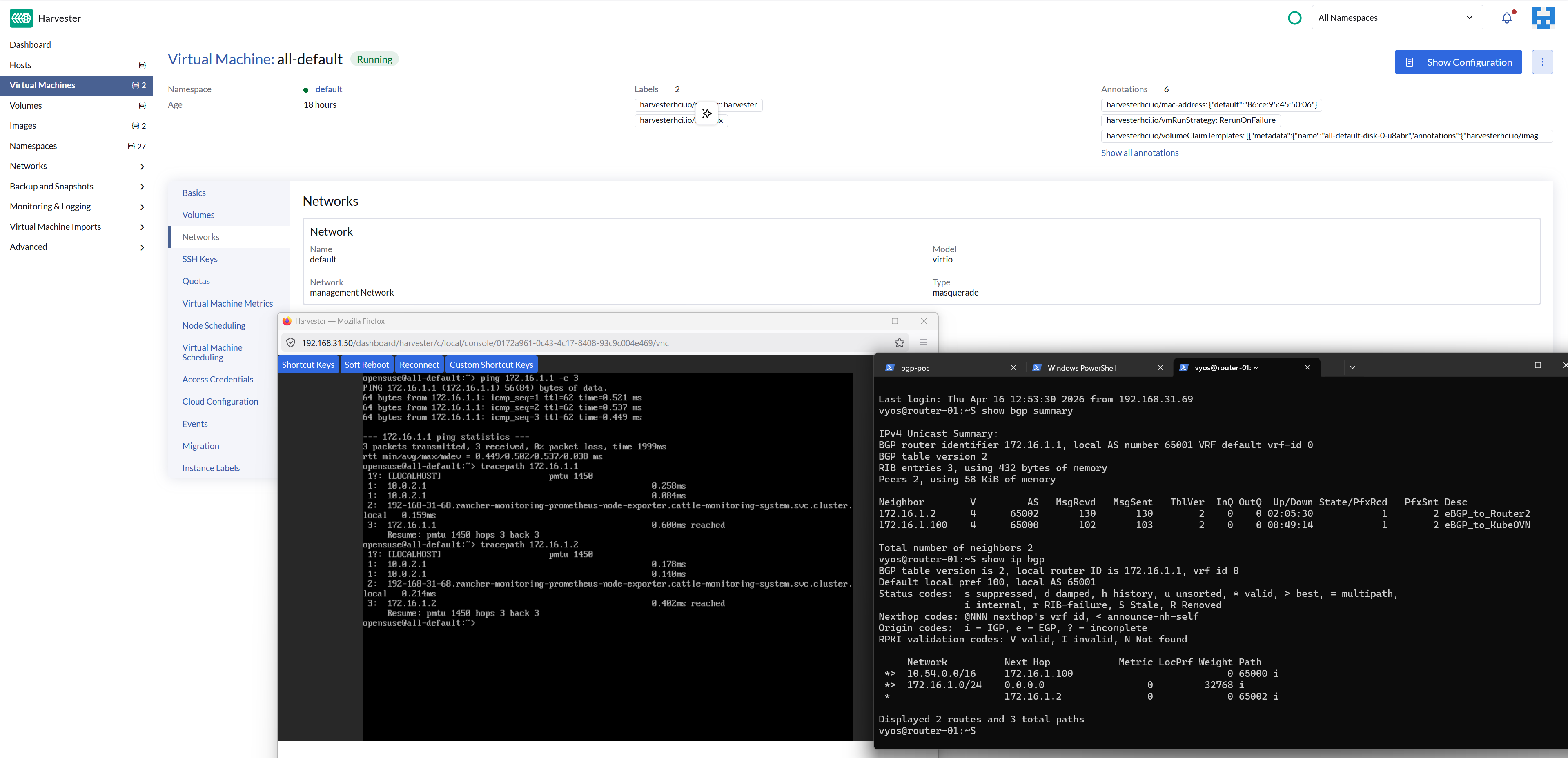
This post documents a proof-of-concept lab that validates BGP route propagation between Kube-OVN's built-in speaker, two VyOS sagitta (1.4.x) routers, and a Harvester cluster, all running as Hyper-V VMs on a single Windows host.
The end-state we are aiming for is a successful ping from router-02 to a Kube-OVN pod IP, with every hop learned via BGP :
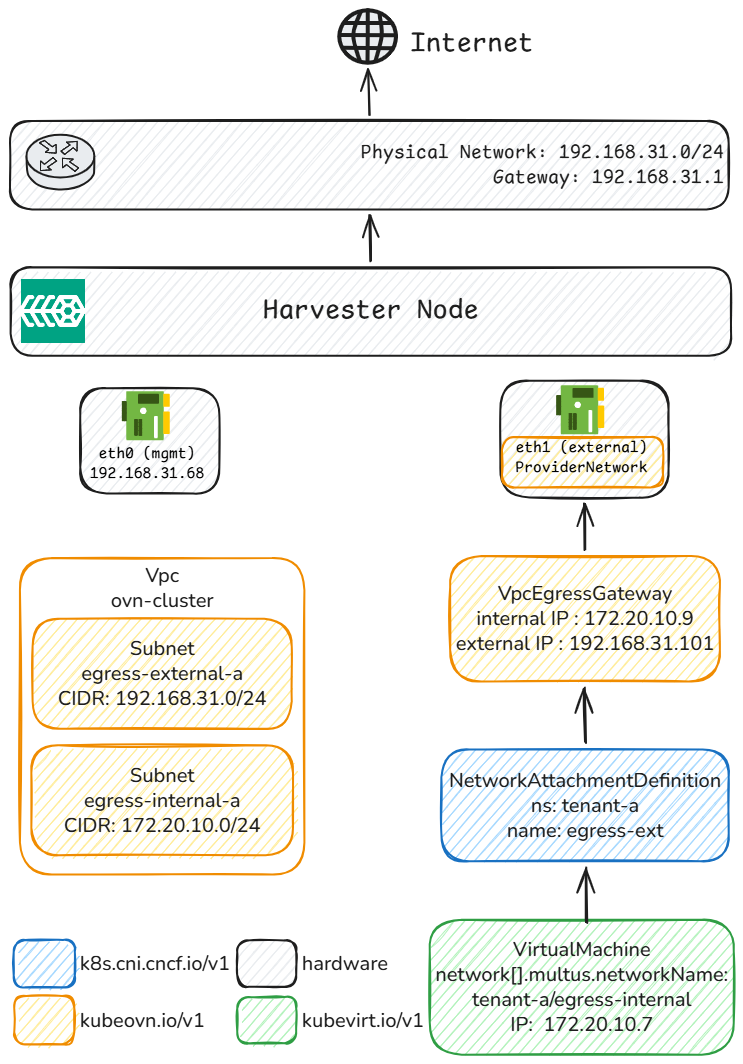
This article is the result of one of my very first deep-dives into Harvester (aka SUSE Virtualization) not related to storage. It describes how to configure dedicated egress IPs per tenant (aka Namespace) on Harvester using Kube-OVN's VpcEgressGateway and we will go in unexplored territory here with release-candidates 🔖, experimental features 🧪 & hot fixes 🔥 on top of bugs 🪳 that are yet to be reported 📑.
Over the past month, I ran three very different projects with AI as my primary collaborator (OpenClaw + Claude Opus 4.6). Each project used a different approach : AI as refactoring assistant, AI as autonomous builder, AI as research partner. Not a tool I prompted occasionally. A coworker I paired with for hours.
The projects :
GIA — refactoring and translating an existing app. AI as assistant.
Chat my Resume — building a chatbot from scratch. AI as autonomous builder.
LLM Bench Lab — benchmarking GPUs and writing a technical blog. AI as research partner.
Three approaches. Three very different results. None of them went smoothly.
For about a year, I have been working daily with various coding assistants, choosing different tools depending on my mood, needs and constraints. My journey has included testing Windsurf and Tabnine professionally, while personally transitioning from being a fervent Copilot user to adopting Claude Code.
During this exploration, I discovered Devstral 2, which ultimately replaced Claude Code in my workflow for several compelling reasons:
Aesthetic Excellence: The tool offers a beautiful user experience.
From the blog post announcement to the API documentation and vibe itself, the color scheme, visual effects, and overall polish create a distinctly pleasant working environment.
Comparable Performance: In the "me, myself & I benchmark", Devstral 2 code suggestion is on par with Claude Code.
While both trend to occasionally overlook framework documentation ; they deliver excellent results overall when refactoring, suggesting commit message, or tweaking CSS.
Cost-Effective and Open Source: Devstral 2 is significantly more affordable than Claude Code and is open source.
Users receive 1 million tokens for trial, with pricing at $0.10/$0.30 for Devstral Small 2 past the 1st million.
With Claude Code, I frequently hit usage limits, even after employing /compact commands and tracking my /usage.
And even if you bust the vibe usage limits it has:
Local Execution Capability: Although vibe time to first token can be slower than claude, Mistral offers a crucial advantage !
Both Devstral 2 & small version are open source with the ability to run entirely on local machines, providing greater control, privacy, and if you have the gear, blazing-fast performance⚡.
The documentation to run it locally is rather sparse and Devstral-2-small is still relatively resource-intensive, therefore needing some tweaks.
Here are the instructions for running Devstral 2 small + vibe on Ubuntu 24.04 with an NVIDIA L40S with 24GB VRAM hosted by Scaleway .
Welcome to LaFabrique.AI! An evolution of storage-chaos.io. This blog tracks and documents the beginning of a journey through the world of artificial intelligence.
Managing multiple networks for storage workloads on OpenShift is not optional: it is essential for performance and isolation. Dell PowerFlex , with its CSI driver, delivers dynamic storage provisioning, but multi-network setups require proper configuration.
This guide explains how to enable multi-network support for CSI PowerFlex on OpenShift, including prerequisites, network attachment definitions, and best practices for high availability.
PowerStore Metro enables active-active synchronous replication between two PowerStore clusters, delivering zero data loss (RPO 0) and continuous availability. Integrated with the Dell CSI driver, it brings high availability to Kubernetes applications that lack native HA by presenting a single Metro-replicated volume accessible from both sites.
Dell PowerScale is a scale-out NAS solution designed for high-performance, enterprise-grade file storage and multi-tenant environments. In multi-tenant environments, such as shared Kubernetes clusters, isolating workloads and data access is critical.
PowerScale addresses this need through Access Zones, which logically partition the cluster to enforce authentication boundaries, export rules, and quota policies. The Dell CSI driver maps Kubernetes StorageClass resources to specific Access Zones, providing per-tenant isolation at the storage layer.
This setup is particularly useful when multiple teams share a common PowerScale backend but require strict separation of data and access controls. This approach proved extremely valuable when building a GPU-as-a-Service AI Factory .