Per-Namespace Egress IPs on Harvester with Kube-OVN VpcEgressGateway
This article is the result of one of my very first deep-dives into Harvester (aka SUSE Virtualization) not related to storage. It describes how to configure dedicated egress IPs per tenant (aka Namespace) on Harvester using Kube-OVN's VpcEgressGateway and we will go in unexplored territory here with release-candidates, experimental features & hot fixes on top of bugs that are yet to be reported.
The problem
In multi-tenant environments, each tenant's traffic often needs to exit through a known, stable IP address. Firewalls, compliance audits, and partner integrations all rely on predictable source IPs rather than node IPs that change with pod scheduling.
The solution
Kube-OVN's VpcEgressGateway CRD provides exactly this: a per-namespace egress gateway that applies SNAT to overlay traffic through a dedicated external IP.
It supports ECMP load balancing and BFD for fast failover.
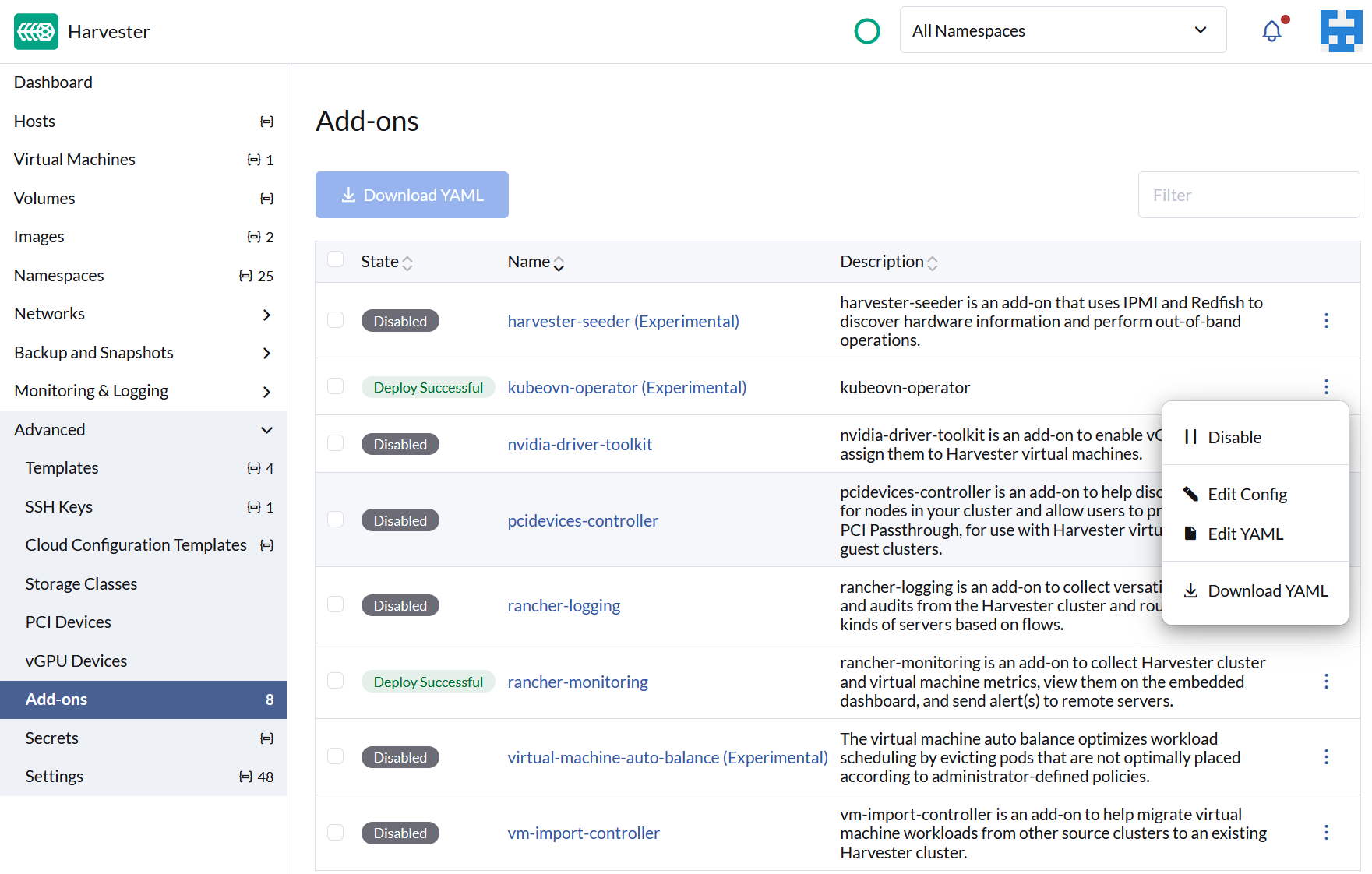
On Harvester v1.8.0-rc2, the kubeovn-operator addon ships Kube-OVN v1.15.4 with --non-primary-cni-mode=true enabled by default.
This makes VpcEgressGateway available alongside Harvester's primary Canal CNI.
Harvester UI naming
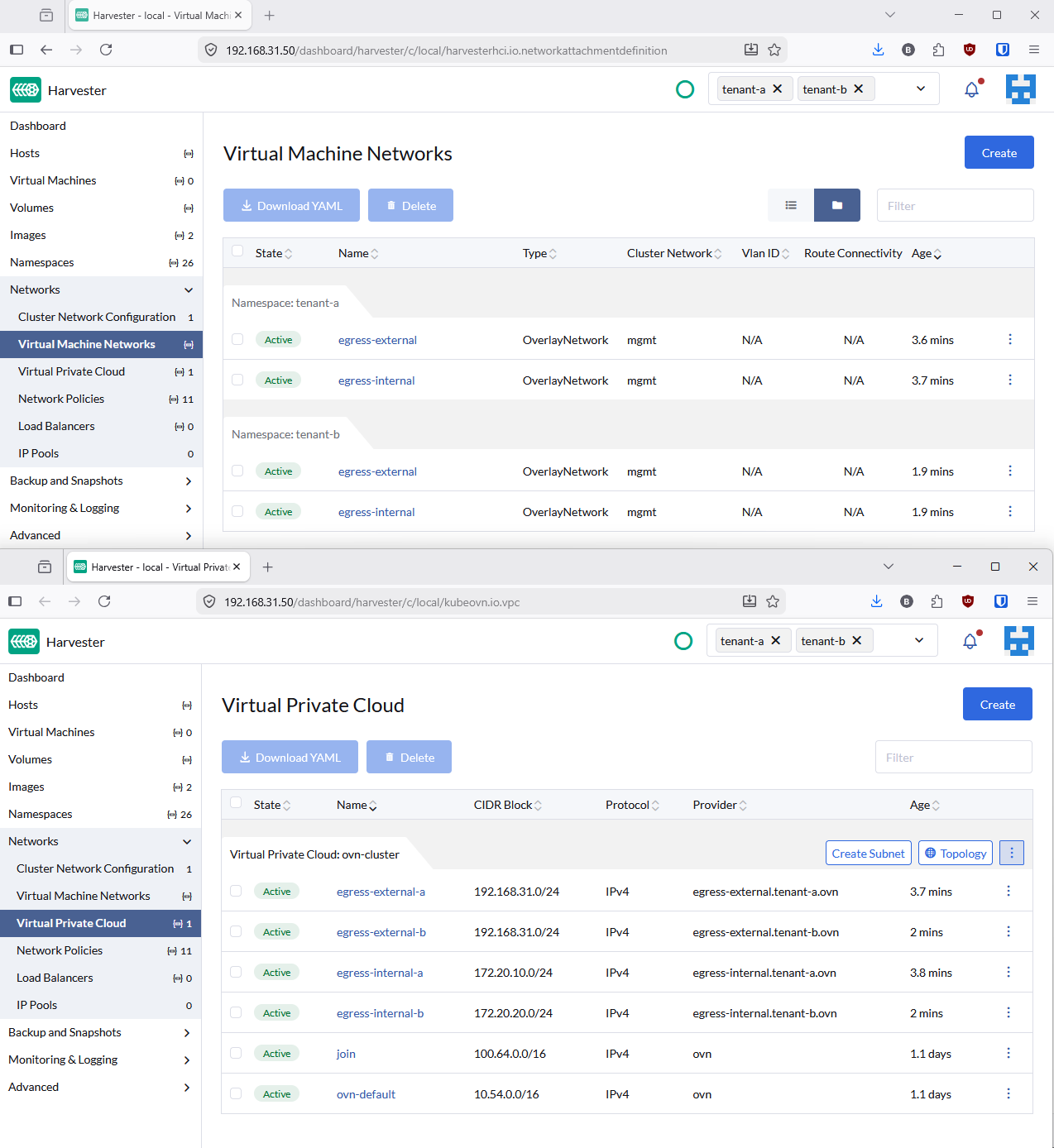
The Harvester UI renames certain Kubernetes resource kinds. This blog uses the original API names, but here is the mapping:
| Kubernetes Resource | Harvester UI Name |
|---|---|
NetworkAttachmentDefinition |
Virtual Machine Networks |
Subnet |
Virtual Private Cloud |
Architecture
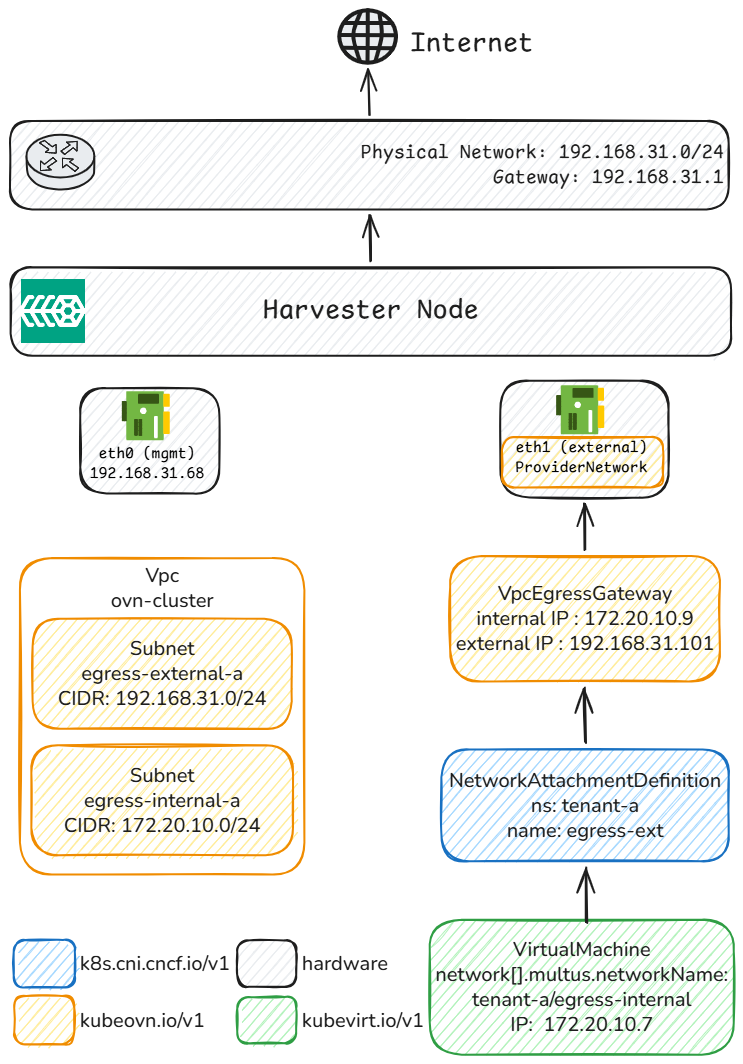
Each tenant gets its own overlay subnet, egress gateway, and dedicated external IP. The OVN logical router uses policy-based routing to redirect tenant traffic through the corresponding gateway, which applies SNAT before forwarding to the physical network. All VMs within a tenant namespace share the same egress IP, regardless of which node they run on.
Prerequisites
- Harvester v1.8.0-rc2 with the kubeovn-operator addon enabled
- A dedicated NIC (
eth1) on the same L2 segment as the management network - MAC address spoofing enabled on the dedicated NIC (Hyper-V: VM Settings > Network Adapter > Advanced Features). Without it, OVS sends packets with pod MACs that Hyper-V silently drops.
Setup
Step 1: Create the infrastructure
Create a Kube-OVN ProviderNetwork on the dedicated NIC.
This creates an OVS bridge that connects OVN to the physical network.
# manifests/infra/00-provider-network.yaml
apiVersion: kubeovn.io/v1
kind: ProviderNetwork
metadata:
  name: pn-external
spec:
  defaultInterface: eth1
# manifests/infra/01-vlan.yaml
apiVersion: kubeovn.io/v1
kind: Vlan
metadata:
  name: vlan0-ext
spec:
  id: 0
  provider: pn-external
kubectl apply -f manifests/infra/
# Wait for ProviderNetwork to be READY
kubectl get provider-networks.kubeovn.io pn-external
Step 2: Configure tenant networking
Each tenant needs four resources: an internal OVN overlay for VM traffic and an external underlay for the gateway's physical connectivity.
Both use kube-ovn type NetworkAttachmentDefinitions (NADs), which is what Harvester's network webhook accepts.
Internal overlay (where VMs live):
# NAD
apiVersion: k8s.cni.cncf.io/v1
kind: NetworkAttachmentDefinition
metadata:
  name: ovn-internal
  namespace: tenant-a
spec:
  config: >-
    {
      "cniVersion": "0.3.1",
      "type": "kube-ovn",
      "server_socket": "/run/openvswitch/kube-ovn-daemon.sock",
      "provider": "ovn-internal.tenant-a.ovn"
    }
---
# Subnet
apiVersion: kubeovn.io/v1
kind: Subnet
metadata:
  name: egress-internal-a
spec:
  cidrBlock: 172.20.10.0/24
  gateway: 172.20.10.1
  provider: ovn-internal.tenant-a.ovn
  vpc: ovn-cluster
  enableDHCP: true
External underlay (connects the gateway to the physical network):
# NAD
apiVersion: k8s.cni.cncf.io/v1
kind: NetworkAttachmentDefinition
metadata:
  name: egress-ext
  namespace: tenant-a
spec:
  config: >-
    {
      "cniVersion": "0.3.1",
      "type": "kube-ovn",
      "server_socket": "/run/openvswitch/kube-ovn-daemon.sock",
      "provider": "egress-ext.tenant-a.ovn"
    }
---
# Subnet
apiVersion: kubeovn.io/v1
kind: Subnet
metadata:
  name: egress-external-a
spec:
  cidrBlock: 192.168.31.0/24
  gateway: 192.168.31.1
  provider: egress-ext.tenant-a.ovn
  vlan: vlan0-ext
  vpc: ovn-cluster
  excludeIps:
    - 192.168.31.1..192.168.31.100
    - 192.168.31.111..192.168.31.254
Step 3: Deploy the egress gateway
Create the VpcEgressGateway CRD.
The policies.subnets field must reference the internal subnet so that OVN's lr-policy knows which traffic to redirect.
apiVersion: kubeovn.io/v1
kind: VpcEgressGateway
metadata:
  name: egress-tenant-a
  namespace: tenant-a
spec:
  vpc: ovn-cluster
  replicas: 1
  internalSubnet: egress-internal-a
  externalSubnet: egress-external-a
  externalIPs:
    - 192.168.31.101
  policies:
    - snat: true
      subnets:
        - egress-internal-a
Step 4: Apply the workaround 🔥
The VpcEgressGateway controller has a known issue in --non-primary-cni-mode: it does not attach the internal OVN Subnet as a Multus network interface.
This is caused by a missing annotation.
A simple patch fixes this by setting the internal NAD as the pod's default network:
./manifests/patch-deployment.sh tenant-a egress-tenant-a
The patch-deployment.sh script adds v1.multus-cni.io/default-network: tenant-a/ovn-internal to the gateway Deployment's pod template.
This makes the gateway pod's eth0 the OVN overlay interface, matching the expected behavior from the VpcEgressGateway documentation.
Note
This workaround is needed because the equivalent fix (PR #6212) was only applied to VpcNatGateway, not VpcEgressGateway.
Step 5: Deploy VMs
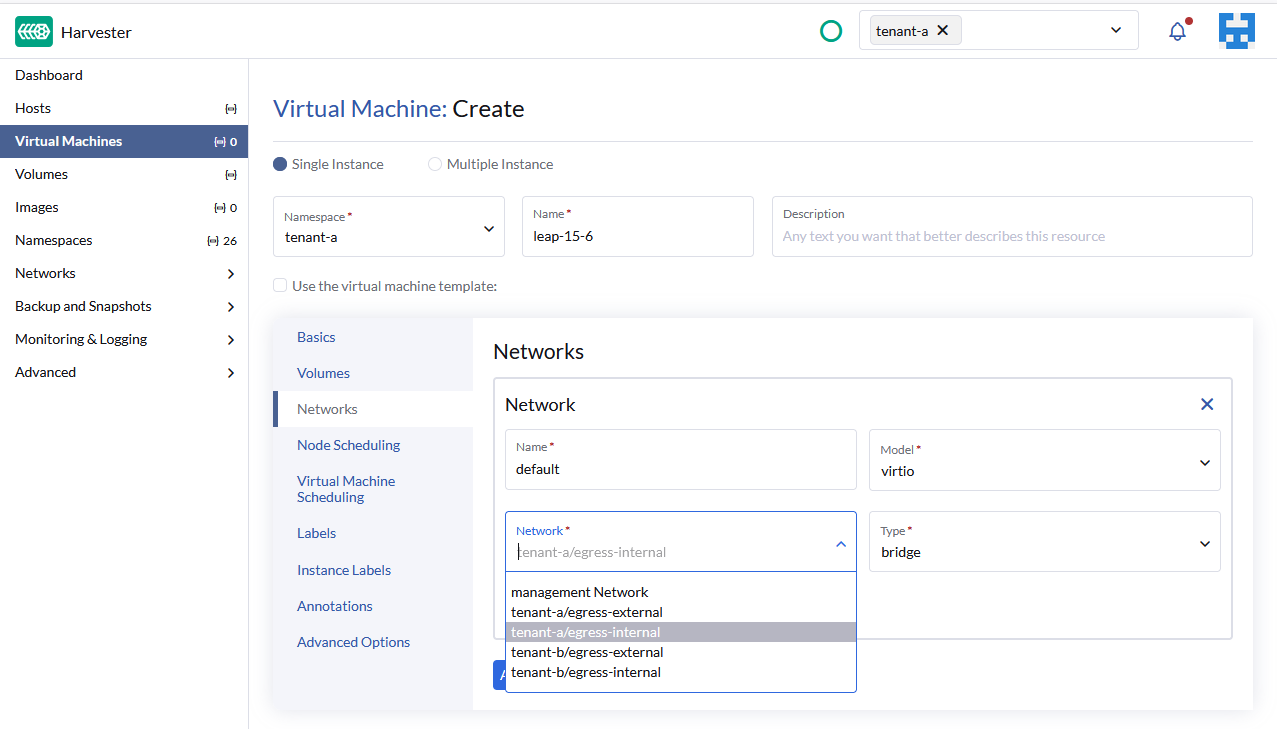
Create VMs attached to the tenant's internal OVN overlay.
With DHCP enabled on the Subnet, VMs automatically receive an IP and default route via the OVN gateway.
kubectl apply -f manifests/tenant-a/06-vm-test-1.yaml
Verification
Resource overview
Run the following command to check all resources at once:
Full verification command
echo "=== VPC Egress Gateways ===" \
  && kubectl get vpc-egress-gateways.kubeovn.io -A -o wide \
  && echo "" \
  && echo "=== Virtual Machines ===" \
  && kubectl get vmi -A -o wide \
  && echo "" \
  && echo "=== Gateway Pod ===" \
  && kubectl get pods -n tenant-a \
       -l ovn.kubernetes.io/vpc-egress-gateway -o wide \
  && echo "" \
  && echo "=== Subnets ===" \
  && kubectl get subnets.kubeovn.io \
  && echo "" \
  && echo "=== Network Attachments ===" \
  && kubectl get net-attach-def -A \
  && echo "" \
  && echo "=== ProviderNetwork ===" \
  && kubectl get provider-networks.kubeovn.io
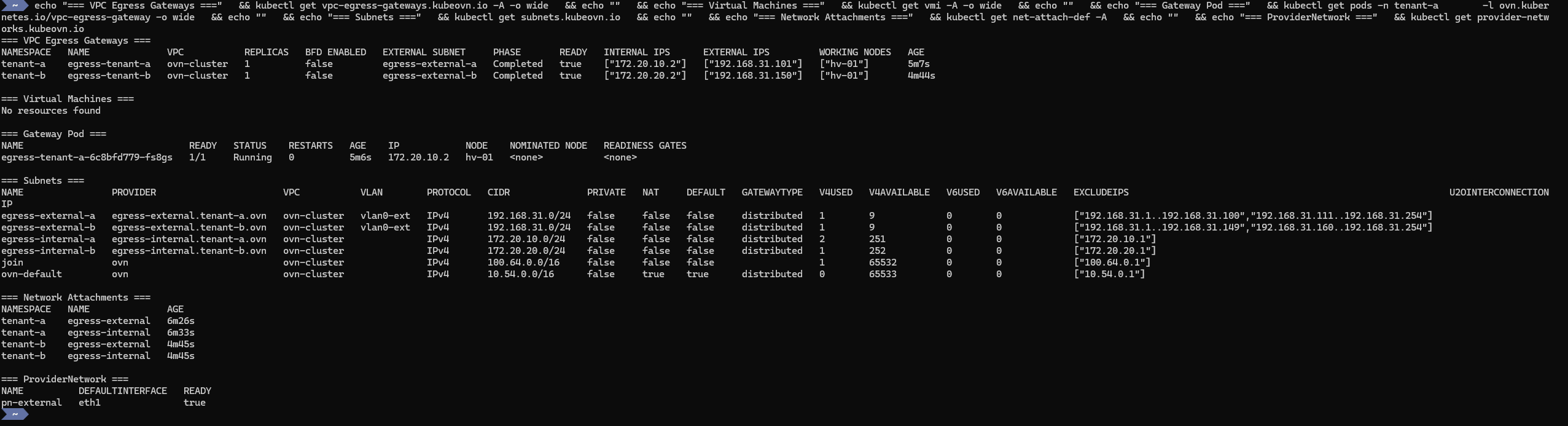
When everything is healthy, you should see:
- Egress Gateway: READY, egress IP
192.168.31.101 - VM: running on
172.20.10.8 - Gateway pod: running on
172.20.10.9 Subnets: internal overlay + external underlayNetworkAttachmentDefinitions: both intenant-aProviderNetwork:eth1READY
Connectivity and egress proof
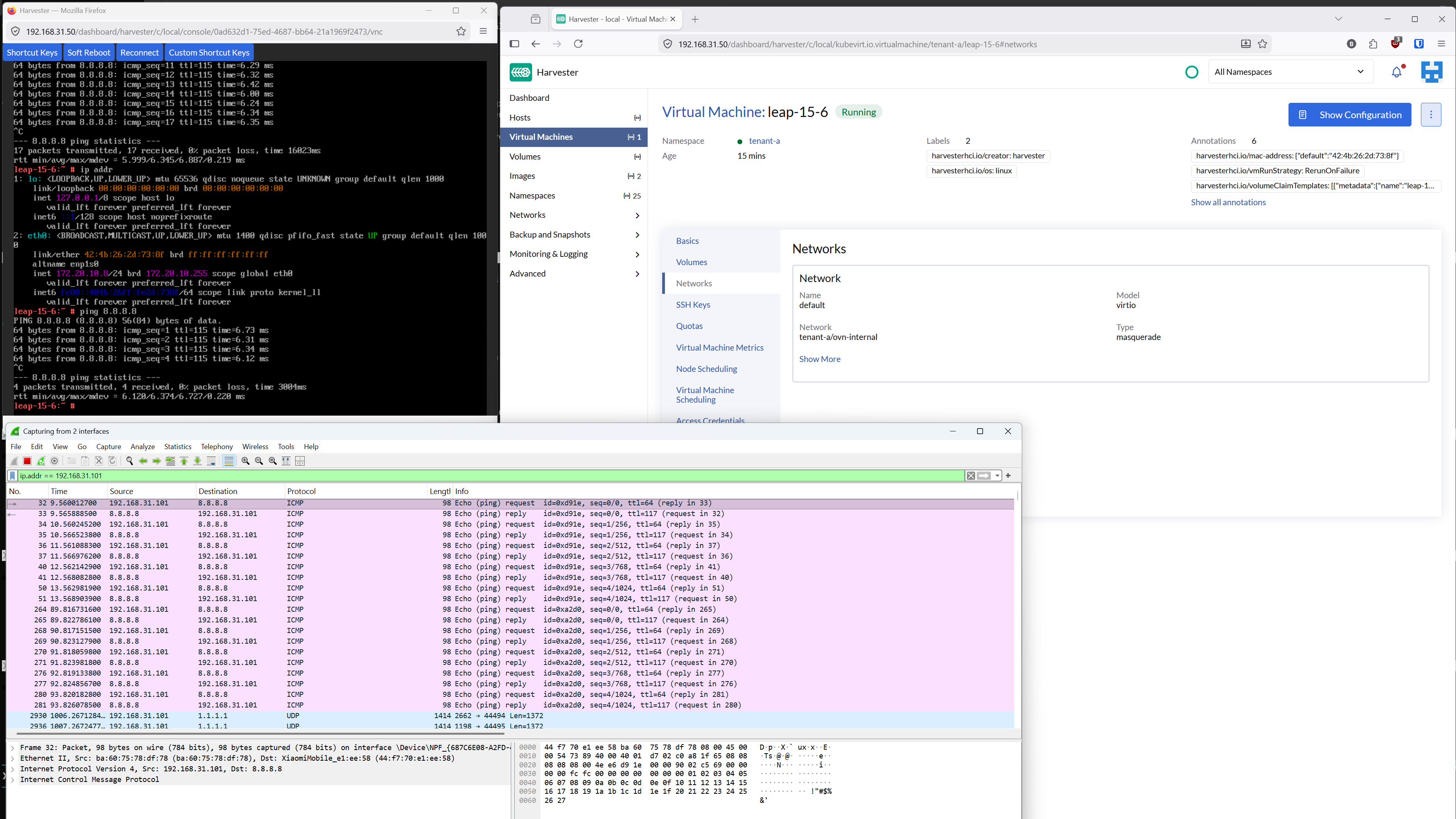
From the VM console, ping any external host:
ping 8.8.8.8
Then capture traffic on the dedicated NIC (eth1) with filter host 192.168.31.101.
Traffic from the VM appears with source IP 192.168.31.101, the tenant's egress IP, not the node IP.
Adding more tenants
You can repeat steps 2 through 5 with a different namespace, internal subnet CIDR, and external IP.
For example, the repo gives configuration for:
| Tenant | Internal Subnet | Egress IP |
|---|---|---|
| tenant-a | 172.20.10.0/24 | 192.168.31.101 |
| tenant-b | 172.20.20.0/24 | 192.168.31.150 |
That way all VMs in a given tenant exit with the same source IP, and each tenant's traffic is fully isolated.
Key design decisions
Why a dedicated NIC?
Harvester's management bridge (mgmt-br) is a Linux bridge with VLAN filtering on top of a bond.
Using it as a Kube-OVN ProviderNetwork causes ARP resolution failures.
A dedicated NIC avoids this entirely.
Why kube-ovn type NADs?
Harvester's network webhook only accepts bridge and kube-ovn type NetworkAttachmentDefinitions.
The stock VpcEgressGateway docs use macvlan, which Harvester rejects.
Using kube-ovn type NetworkAttachmentDefinitions with a ProviderNetwork achieves the same result while passing webhook validation.
Why does policies.subnets reference the internal subnet?
The VpcEgressGateway creates OVN lr-policy rules that match source IPs.
VMs are on the internal overlay subnet, so the policy must reference that subnet for the reroute to trigger.
Repository
All manifests are available at github.com/coulof/egress-ip-poc .
kubectl apply -f manifests/infra/
kubectl apply -f manifests/tenant-a/
./manifests/patch-deployment.sh tenant-a egress-tenant-a
Conclusion
With Kube-OVN's VpcEgressGateway and a dedicated NIC, you can assign stable, per-tenant egress IPs on Harvester.
Each namespace gets its own SNAT gateway, making firewall rules and compliance audits straightforward.
The setup requires a workaround for --non-primary-cni-mode, but the result is a clean, repeatable pattern that scales to as many tenants as you need.