Enable Storage Multi-tenancy on Kubernetes with PowerScale
Dell PowerScale is a scale-out NAS solution designed for high-performance, enterprise-grade file storage and multi-tenant environments. In multi-tenant environments, such as shared Kubernetes clusters, isolating workloads and data access is critical.
PowerScale addresses this need through Access Zones, which logically partition the cluster to enforce authentication boundaries, export rules, and quota policies. The Dell CSI driver maps Kubernetes StorageClass resources to specific Access Zones, providing per-tenant isolation at the storage layer.
This setup is particularly useful when multiple teams share a common PowerScale backend but require strict separation of data and access controls. This approach proved extremely valuable when building a GPU-as-a-Service AI Factory .
Access Zone Concepts
An Access Zone is an isolated space in PowerScale. It typically includes :
- A dedicated directory (e.g.,
/ifs/data/legal) - A quota on that directory
- A network VLAN/IP pool
- DNS domain and LDAP configuration
For best practices on managing Access Zones, refer to the official documentation .
One Management Network, One Storage Network
In CSM versions prior to v1.15, support for separate management and storage networks was configurable through a global parameter named allowedNetworks . This parameter accepts a list of CIDR entries to select the relevant IP for the node.
Example : a Kubernetes node has two NICs :
- Management Network :
192.168.0.10 - Storage Network :
10.0.0.10
If allowedNetworks is set to 192.168.0.0/24, all Kubernetes nodes on that network will publish their IP address on the export.
In a Helm deployment :
allowedNetworks: [192.168.0.0/24]
In an Operator deployment :
apiVersion: storage.dell.com/v1
kind: ContainerStorageModule
metadata:
  name: isilon
spec:
  driver:
    csiDriverType: "isilon"
    # ...
    node:
      envs:
        - name: X_CSI_ALLOWED_NETWORKS
          value: "[192.168.0.0/24]"
Then configure the StorageClass :
apiVersion: storage.k8s.io/v1
kind: StorageClass
metadata:
  name: powerscale
provisioner: csi-isilon.dellemc.com
reclaimPolicy: Delete
allowVolumeExpansion: true
parameters:
  AccessZone: legal
  IsiPath: /ifs/data/legal
  AzServiceIP: legal.example.com
volumeBindingMode: Immediate
AzServiceIP should be a DNS name
Despite its name, AzServiceIP can and should be a DNS name for accessing the Access Zone.
The following diagram shows the results without allowedNetworks (black) and with it (blue) :
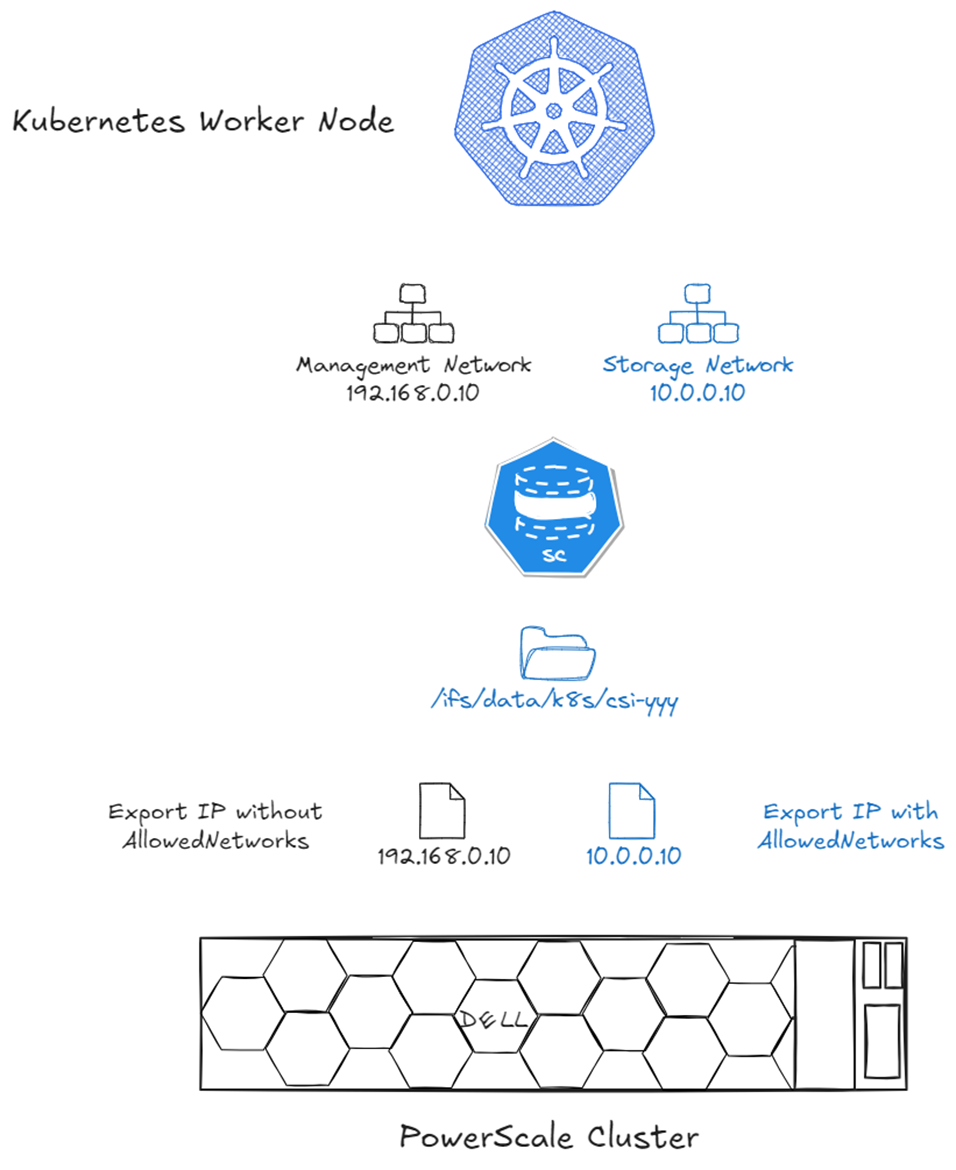
IP selection with allowedNetworks : only the matching CIDR IP is published on the NFS export.
Multiple Storage Networks and Access Zones
While allowedNetworks works well for a single Access Zone or dedicated nodes per Access Zone, it falls short when a Kubernetes node connects to multiple Access Zones.
CSM v1.15 introduced support for multiple Access Zones and multi-tenant Kubernetes clusters using the AzNetwork parameter.
AzNetwork works similarly to allowedNetworks but is defined per StorageClass, allowing IP selection based on CIDR.
Example : a Kubernetes node connects to :
- Management Network :
192.168.0.10 - Legal VLAN :
192.168.100.10 - Engineering VLAN :
10.0.0.10 - Marketing VLAN :
172.16.0.10
This configuration requires three StorageClass definitions :
---
apiVersion: storage.k8s.io/v1
kind: StorageClass
metadata:
  name: powerscale-legal
provisioner: csi-isilon.dellemc.com
reclaimPolicy: Delete
allowVolumeExpansion: true
parameters:
  AccessZone: legal
  AzServiceIP: legal.example.com
  AzNetwork: 192.168.100.0/24
---
apiVersion: storage.k8s.io/v1
kind: StorageClass
metadata:
  name: powerscale-engineering
provisioner: csi-isilon.dellemc.com
reclaimPolicy: Delete
allowVolumeExpansion: true
parameters:
  AccessZone: engineering
  AzServiceIP: engineering.example.com
  AzNetwork: 10.0.0.0/24
---
apiVersion: storage.k8s.io/v1
kind: StorageClass
metadata:
  name: powerscale-marketing
provisioner: csi-isilon.dellemc.com
reclaimPolicy: Delete
allowVolumeExpansion: true
parameters:
  AccessZone: marketing
  AzServiceIP: marketing.example.com
  AzNetwork: 172.16.0.0/24
The diagram below shows the results in the NFS export :
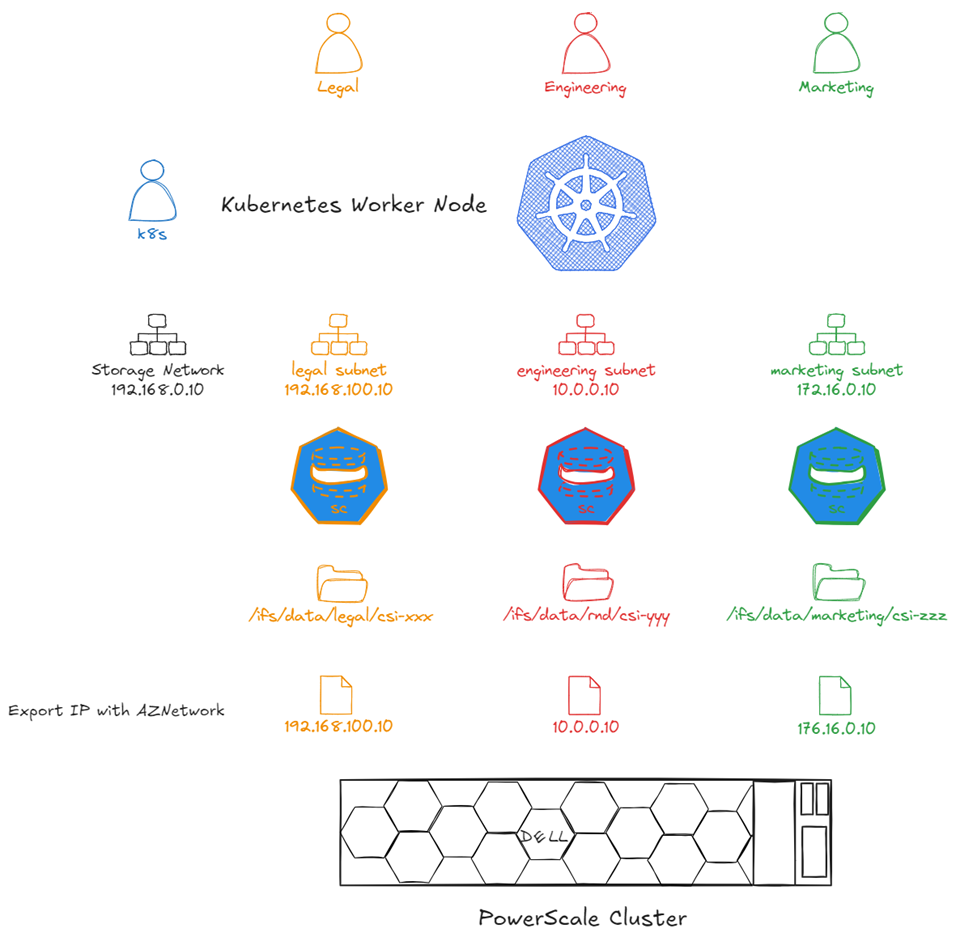
Per-StorageClass IP selection with AzNetwork : each Access Zone export uses the correct VLAN IP.
Greenfield recommendation
Even if you start with a single storage network, use AzNetwork from the beginning. It allows easier expansion to multiple Access Zones later.
Digression on CSI Network Requirements
CSI drivers (including Dell's) consist of two components :
- Controller : handles Kubernetes calls such as create volume, expand volume, delete snapshots, etc.
- Node : formats and mounts the volume
Network communication often simplifies as :
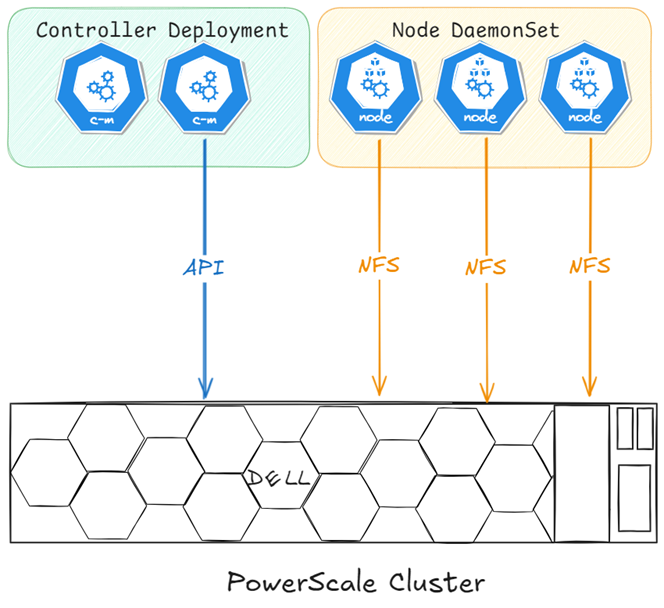
Simplified CSI network communication : controller talks to the storage API, node handles data I/O.
For Dell CSI drivers, the node plugin also checks endpoint health, requiring API communication from all nodes in the cluster :
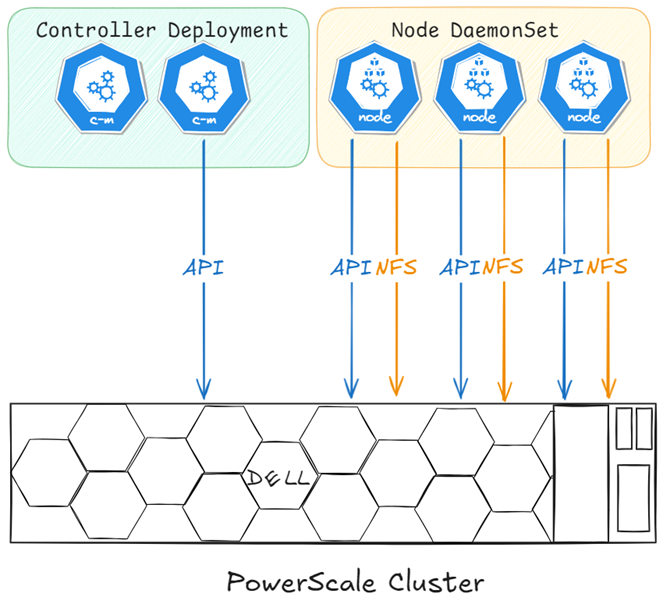
Dell CSI network communication : the node plugin requires API access for health checks, not just data I/O.
If complete isolation is required (e.g., MSP environments), CSM Authorization can help. Deploy CSM Authorization with connectivity to both networks : Kubernetes on the DMZ and PowerScale management.
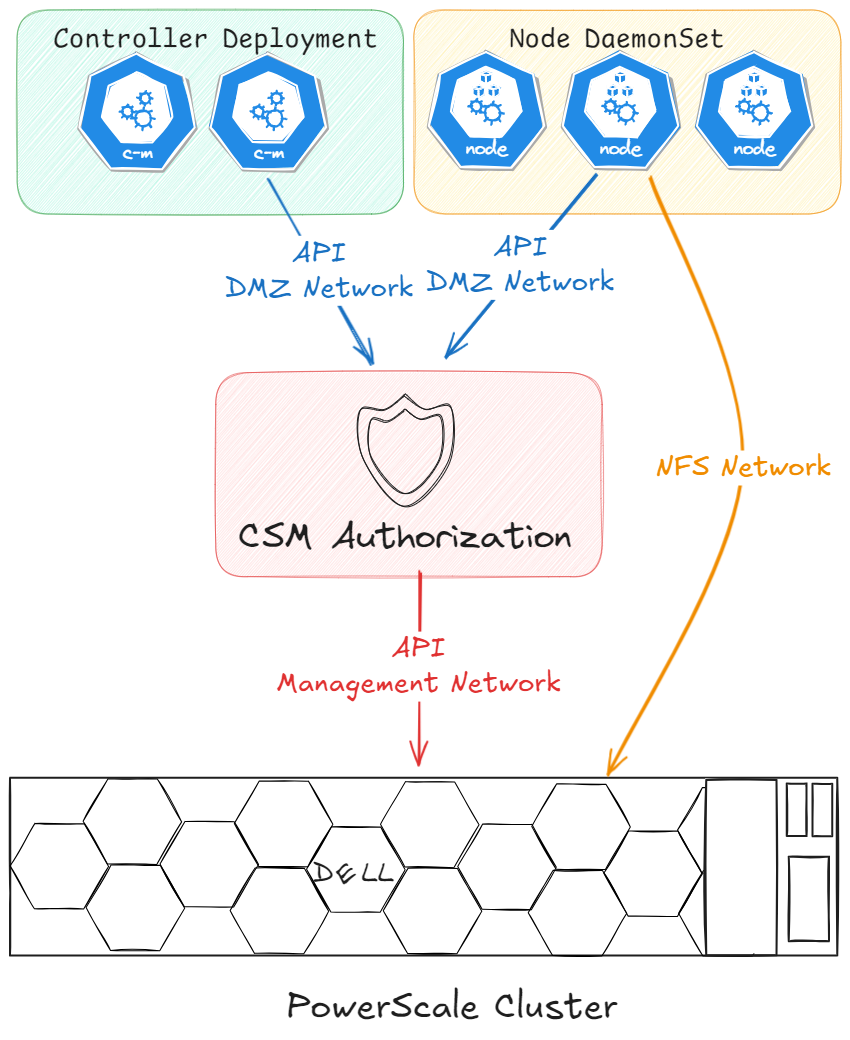
CSM Authorization acts as a proxy, isolating Kubernetes nodes from direct PowerScale management access.
Key Takeaways
- PowerScale Access Zones enable secure multi-tenancy in Kubernetes
allowedNetworkscontrols IP selection for exports in single-zone setupsAzNetworkallows per-StorageClass IP selection for multi-zone environments- Dell CSI drivers require API access from all nodes for health checks
- CSM Authorization provides isolation for managed service providers